The below guide is intended for users with access to both User Management in HART (Configuration > Access > Users) as well as the organisations Azure Entra console.
- Via Configuration > Access > Users, HART logins are created without a password. The email entered against the user must match exactly with what will be returned from Azure (including capitalisation)

- Within the HART folder (C:\Program Files (x86)\HART) of each client the latest Azure Login files must be present. Please contact HART Support to confirm the latest version in use
- On logging into HART with their username, the default browser will open to the Azure authentication page where the Azure log-in process will take place. If successfully authenticated users will receive a confirmation message and be able to return to HART and continue the log-on process.
In scenarios where users successfully authenticate via Azure however there is a further issue they will receive a message from HART as below:
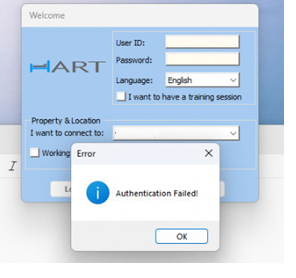
Within the HART folder (C:\Program Files (x86)\HART ) the first file that should be located has the name azurelogon.txt. This will detail where email addresses including their syntax do not match:

Either the user details in Azure or HART must be updated to match. Within HART this is managed via Configuration > Access > Users as above.
If there is no error logged within the azurelogon file, locate the msaLogs.txt file which contains more detailed information of the requesting of the authentication token and the result.
In a scenario where users are receiving an Invalid Username or Password message from HART and they are not reaching the Azure log on screen, the most likely causes are:
- An incorrect username is being used
- The password has been removed from the user profile in HART (Configuration > Access > Users) however the user is attempting logon with using a password
- The user has attempted logging on multiple times in a short space of time triggering HART''s inbuilt throttling mechanism. In this case the user profile must be unlocked via Configuration > Access > Users)

Finally if the property is using the timeout settings (Configuration > Global) ensure this is removed as this feature can not be used with SSO
In rare cases it may be necessary to fire the Azure application from the HART folder before the first use via HART. To do so, from the HART folder (C:\Program Files (x86)\HART) locate and run the HARTAzureAuth.exe and HartPreReqNew.exe files. Following this return to the HART log-in screen to initiate the log-in process.
For any further queries please contact HART support
Was this article helpful?
That’s Great!
Thank you for your feedback
Sorry! We couldn't be helpful
Thank you for your feedback
Feedback sent
We appreciate your effort and will try to fix the article