This guide looks at the Reservations Times tool available in HART PMS which is available following the Q3 2026 update
The Reservations Times tool is located in the upper tool bar under the Tools menu. It allows for the quick and if required multiple update of arrival and/or departure times of room reservations.
The Reservation Times tool can be found here:

This toll is designed predominantly be allow for the quick update of expected departure times and as such the date selector works based on the departure date of reservations.
An update to either expected arrival and/or departure time can be made for multiple reservations and the check box ticked to indicate that an update has been made followed by the Save button
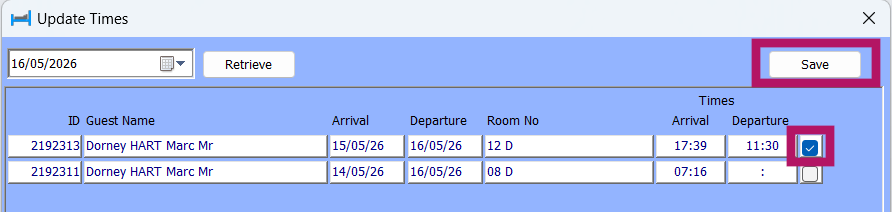
The update will then be committed to the reservation and appear on all relevant reports where the ETA and/or ETD are displayed
Was this article helpful?
That’s Great!
Thank you for your feedback
Sorry! We couldn't be helpful
Thank you for your feedback
Feedback sent
We appreciate your effort and will try to fix the article