This article walks through the steps to pair Trust Payments PDQ terminals within HART so integrated payments can take place.
A pre-requisite is that the property has a Trust Payments accounts and hardware in place. Please contact HART Support for further information
Before completing the steps below ensure that each PDQ has been activated and connected to the relevant Wi-Fi network.
Locate the Network ID of the PDQ terminal. This can typically be found on the Network Configuration receipt or via the Network Settings menu on the PDQ
This number and the default location of that machine (e.g. Reception) should be noted. At this stage we recommend labelling each machine with its default location.
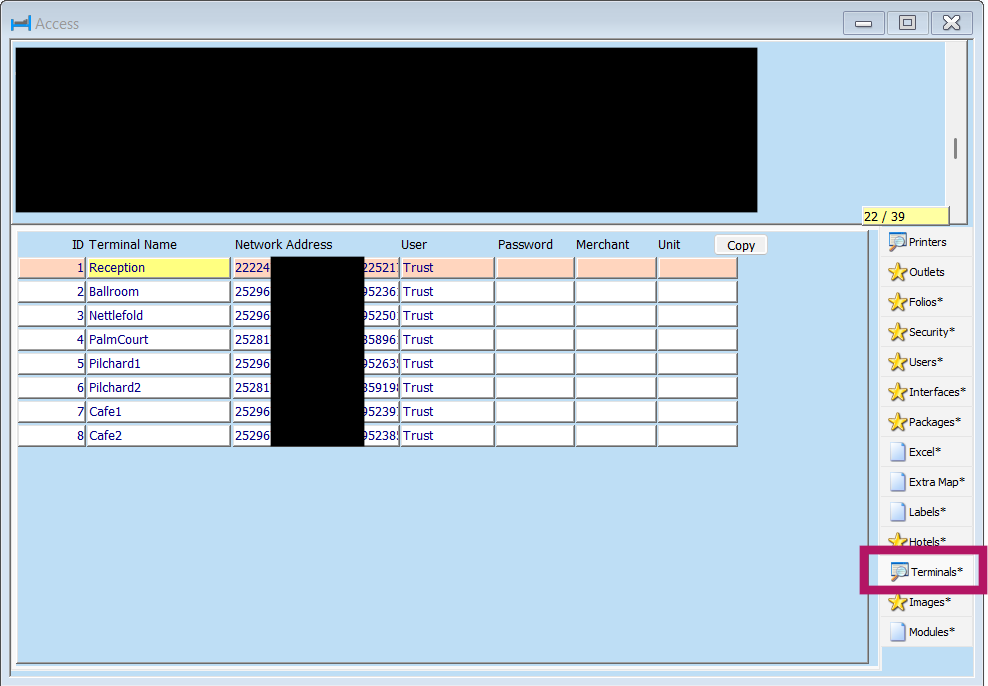
Via Configuration > Access > Terminals load the PDQ terminal information::
- ID: Will be automatically generated on Save
- Terminal Name: The default location of the terminal
- Network Address: The Network ID as noted from the process above
- User: Must always be set to Trust
- All remaining fields are to be left blank
Once complete the integration needs to be set via Configuration > Global > Advanced 2 where within the Terminal Integration section each area should be set to TrustPayments

For information on selecting an integrated PDQ and utilising integrated payments please see our dedicated guide here
Was this article helpful?
That’s Great!
Thank you for your feedback
Sorry! We couldn't be helpful
Thank you for your feedback
Feedback sent
We appreciate your effort and will try to fix the article