At the end of the article you will understand the capabilities of the Daily Memo report.
This report is generated via Reports/ Front Desk/ Daily Memo for either past, the current, or future dates. It is designed to be exported to .pdf format and will shrink to 2 pages of text.
The daily memo is made up of various sections:
- Header and stats information
- Departures for the day
- Arrivals for the day
- Spa Reservations
- Transport
- Events
- In-house Guests
- Arrivals for the following day
Header and statistics information
Whilst the statistics information is pulled directly from existing data within Hart
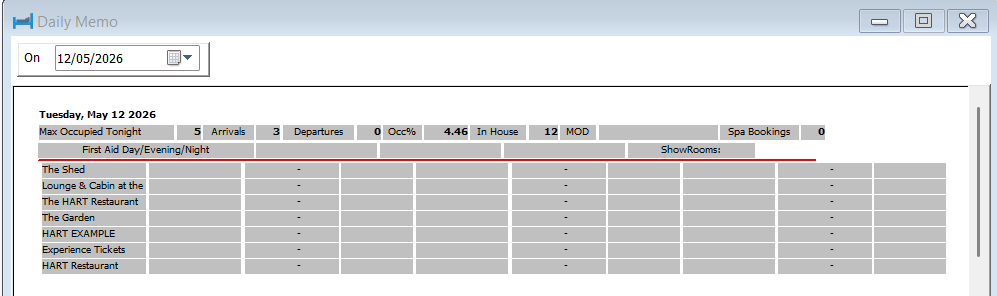
it is necessary to load the details for Manager On Duty and First Aiders. This information is stored within Configuration > Global > Duty Managers. Simply right click and add entry to free type your Duty Managers.
Departures for the day

- Guest Name column pulls both the primary and shared guest details.
- Party defines if the guest belongs to a Group.
- ETD estimated time of Departure (the time field next to the departure date in a Room Booking).
- Notes pulls from a new field within Room Booking called Daily Memo and is an amalgamation of Booking and Guest. Notes as well as dietary or allergen flags. This field can be edited before the Daily Memo is produced.
Arrivals for the day
- Room to show the allocated bedroom.
- Guest Name column pulls both the primary and shared guest details.
- VIP Code to show the VIP status of this guest.
- Party defines if the guest belongs to a Group.
- Visits shows how many time this guest has visited your property before.
- A stands for Adults.
- C stands for children and how many are part of this reservation.
- Nts stands for how many nights the guest will stay.
- Rate reflects the room rate for this booking.
- ETA is the Estimated time of Arrival (the time field next to the departure date in a Room Booking).
- Notes pulls from a new field within Room Booking called Daily Memo and is an amalgamation of Booking and Guest Notes as well as dietary or allergen flags.

Details as per the Departures for the day, however, this list is dynamic and if pulled historically or during the same day will reduce as guests are checked in
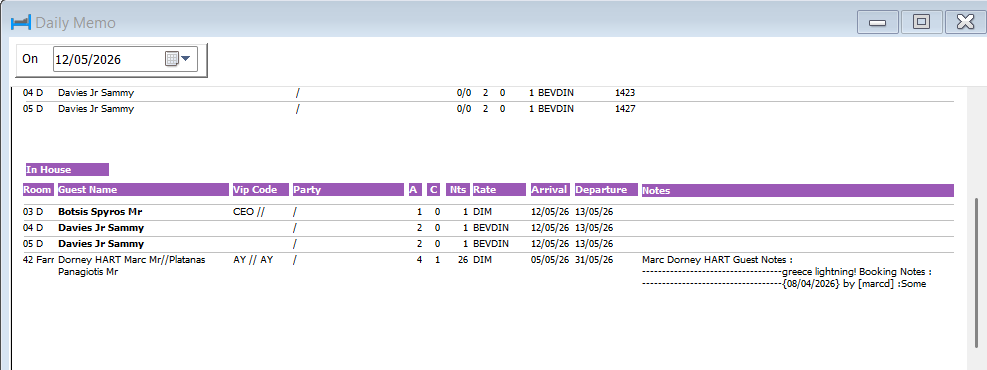
Inhouse
- Room to show the allocated bedroom.
- Guest Name column pulls both the primary and shared guest details.
- VIP Code to show the VIP status of this guest.
- Party defines if the guest belongs to a Group.
- A stands for Adults.
- C stands for children and how many are part of this reservation.
- Nts stands for how many nights the guest will stay.
- Arrival displays the expected departure date.
- Departure shows the expected departure date.
- Notes pulls from a new field within Room Booking called Daily Memo and is an amalgamation of Booking and Guest Notes as well as dietary or allergen flags.
Spa

Details of all spa appointments for the day plus any classes taking place in facilities.
Transport

Details of all transport arrangements for the day which are logged within a Room Booking under the Newspapers tab. On the right hand side of this screen details of transport arrangements can be logged
Events

An overview of any events taking place on the selected date
Was this article helpful?
That’s Great!
Thank you for your feedback
Sorry! We couldn't be helpful
Thank you for your feedback
Feedback sent
We appreciate your effort and will try to fix the article